Home Tab
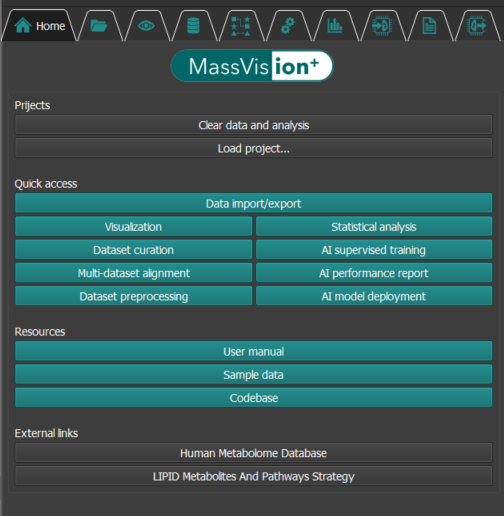
Projects
To clear any open data and analysis in MassVision, click on Clear data and analysis button in Project section. We recommend that users clear MassVision before uploading any new MSI data, or starting a new independent task.
If you have a saved MassVision project that you would like to resume working on, click Load project button.
Important
After loading a saved MassVision project, you must reload the corresponding MSI data to resume editing from where you left off.
MassVision projects contain all processed files, such as annotated scenes, labeled segments, and visualizations. However, the original MSI data used in the analysis is excluded to prevent project size inflation and avoid duplicating the original data.
Quick Access
MassVision is organized into multiple tabs, each containing specific functionalities to help you efficiently manage and navigate the system. The Quick access section provides convenient access to all tabs within MassVision. The available modules include:
Data Import/Export – Importing and exporting MSI and pathology data
Visualization – Interactive visualization tools for data exploration
Dataset Curation – Co-localization, annotation, and labeled dataset generation
Multi-Dataset Alignment – Ion alignment and peak matching between datasets
Dataset Preprocessing – Normalization, filtering and aggregation
Statistical Analysis – Data distribution exploration, box plot, Volcano plot
AI Supervised Training – Feature ranking and selectin, model training and evaluation
AI Performance Report – Modules for evaluating and reporting model performance.
AI Model Deployment – Tools for deploying trained models into whole-slide MSI data.
By selecting a button, you will be directed to the corresponding tab.
Resources
This section provides quick access to essential online support materials that assist users in working effectively with MassVision. This includes:
User Manual – A comprehensive online guide detailing the features, functionality, and usage of the system.
Sample Data – Online example datasets for testing, demonstration, or familiarization with key workflows.
Codebase – Access to the online code repository, enabling users to explore or contribute to the MassVision platform.
By selecting any of these options, users will be directed to the corresponding online resource.
External Links
The External Links section provides direct access to reputable online resources that support and complement the use of MassVision in metabolomics and lipidomics research. These include:
Human Metabolome Database (HMDB) – A comprehensive online resource for information on human metabolites, including detailed chemical, clinical, and biochemical data.
LIPID Metabolites and Pathways Strategy (LIPID MAPS) – A curated platform offering data and tools related to lipid metabolism, structures, pathways, and classification.
Clicking on any of these links will open the respective external website in your default web browser.