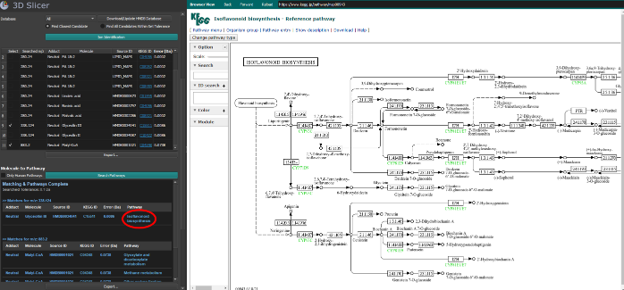
Ion Identification and Pathway Analysis
The Identification tab allows users to annotate mass-to-charge (m/z) peaks by querying established chemical and metabolomic databases. It maps experimental m/z values to candidate lipid and metabolite structures, retrieves available KEGG identifiers, and associates selected molecules with biological pathways.
Databases
Identifying the possible biological origin of m/z peaks is an important step in mass spectrometry analysis. MassVision automates the lookup process using:
LIPID MAPS Structure Database (LMSD): Queried dynamically through the REST API to identify candidate lipid structures.
Human Metabolome Database (HMDB): Queried through a locally built SQLite database for fast and comprehensive metabolite matching.
KEGG: Used to retrieve pathway information for identified molecules.
LIPID MAPS and KEGG are queried through web APIs. HMDB requires a one-time local database setup to provide rapid searches without API rate limits.
Setting up the HMDB database
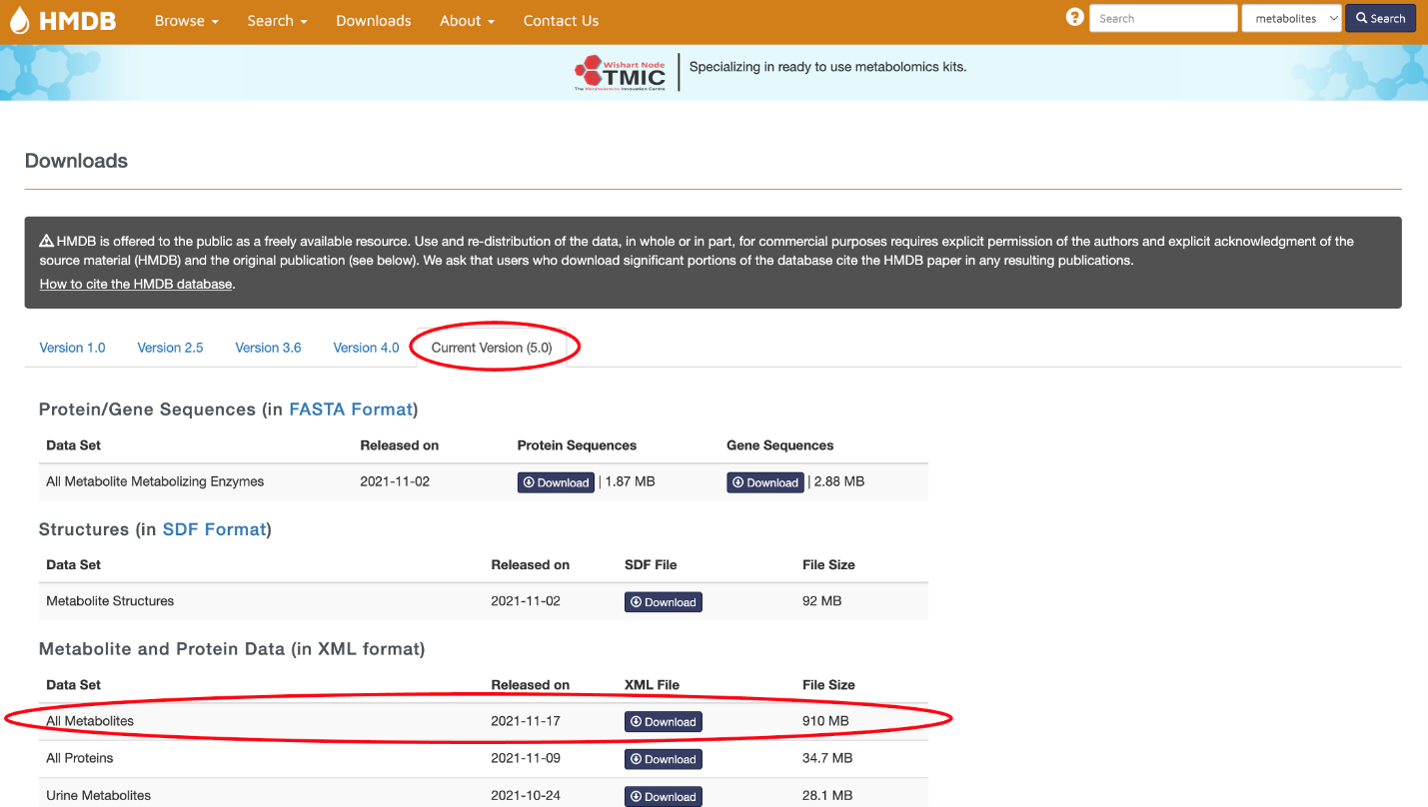
Navigate to the HMDB Downloads page.
Under the most current version tab, locate Metabolite and Protein Data in XML format.
Download the All Metabolites file (
hmdb_metabolites.zip).In the Identification tab, click Download/Update HMDB Database and select the downloaded ZIP file when prompted.
MassVision parses the relevant mass and pathway information from the XML file and builds an optimized local SQLite database named
HMDB_Neutral.db.
Note
You can skip the HMDB setup if you only intend to search the LIPID MAPS database.
Input and Parameters
Click Load CSV file… to import a CSV file containing one column of m/z values. Alternatively, enter or paste a comma-separated list of m/z values directly into the input field.
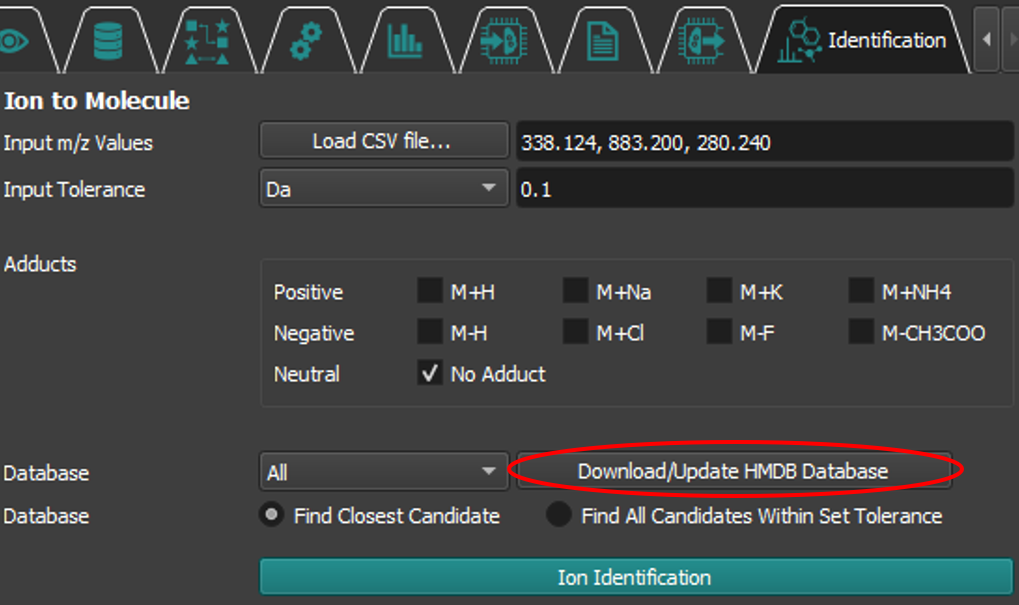
Configure the following parameters and click Ion Identification:
Tolerance: The maximum allowed mass difference between an experimental peak and a database record.
Tolerance unit: Select Da (Daltons) for an absolute tolerance or ppm (parts per million) for a relative tolerance.
Adducts: Select the ion adducts appropriate for the acquisition mode. Multiple adducts can be searched simultaneously. Available options include M+H, M+Na, M+K, M+NH4, M-H, M+Cl, M-F, M-CH3COO, and No Adduct.
Database: Select All to query both databases, LipidMaps to search only the LMSD API, or HMDB to search only the local HMDB database.
Candidate selection: Select Find Closest Candidate to return only the candidate or candidates with the smallest mass error within the specified tolerance. Select Find All Candidates Within Set Tolerance to return every candidate within the tolerance.
Pathway Mapping
After molecules have been identified, select the desired results using their checkboxes and click Search Pathways to map them to known biological pathways.
Filter Human Pathways: Restricts the results to human pathways by excluding bacterial, plant, and other organism-specific pathways.
Output
Ion identification results
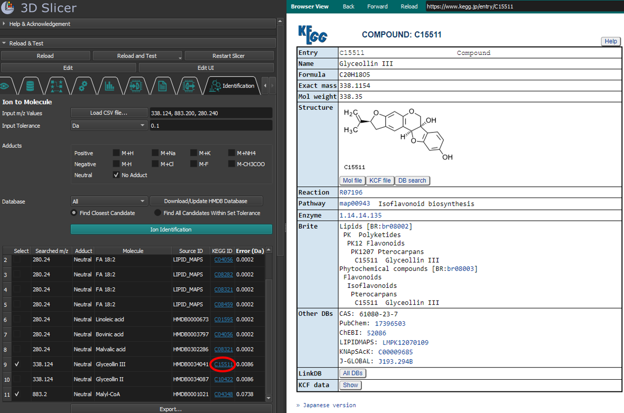
MassVision displays the identification results in a table. Click Export… to save the table as a CSV file. The output includes:
Searched m/z: The original peak value from the input data.
Adduct: The adduct associated with the database match.
Molecule: The biological or chemical name of the candidate molecule.
Source ID: The identifier assigned by the source database.
KEGG ID: The KEGG compound identifier, when available. Click a KEGG ID to open the corresponding compound page in the browser view on the right side of the screen.
Error: The difference between the candidate molecule mass and the searched m/z value, reported in Da or ppm according to the selected tolerance unit.
Pathway results
The pathway results are sorted by searched m/z value and include the adduct, molecule, Source ID, KEGG ID, and mass error, together with:
Pathway: A biological pathway containing the identified molecule. Click the pathway name to open the corresponding KEGG pathway map in the browser view on the right side of the screen.